Prison Bus Controls: How to Start, Drive and Stop the Bus
The Prison Bus controls that start, drive and stop the bus: fit 4 wheels, fill the tank, press E to Drive, and how pickups, gas stops and checkpoints work.
Starting the bus in Prison Bus comes down to one control: press E to Drive. Walk in through the bus's front door, sit down at the wheel, and E starts the journey toward Prison. That input only works once the bus is actually ready to leave — all 4 wheels fitted to the hubs and the tank filled from a fuel can — and once you're rolling, the run's interactions mostly handle themselves: the prisoner pickup, the gas station refuel and the army checkpoint all begin when the bus reaches those stops.
Quick answer
Enter the bus through the front door, sit at the wheel and press E to Drive.
- E works only once the bus is ready to leave: 4 wheels on the hubs and the tank filled from a fuel can.
- Driving brings up a Miles Left progress bar, a speedometer and a fuel gauge on screen.
- The PRISONER PICKUP, GAS STATION AHEAD and ARMY CHECKPOINT stops trigger on arrival — none of them needs controls of its own.
Getting behind the wheel
A transport run opens in the garage with the bus not yet drivable, so two jobs always come first. The four wheels go onto the bus's hubs, and the tank gets filled with a fuel can. Only then does the start sequence proper begin, and it is short: in through the front door, into the driver's seat, and E.
Checklist
- Install the 4 wheels
Fit all four wheels onto the bus's hubs.
- Fill the tank
Use a fuel can to fill the bus tank before departing.
- Board through the front door
Enter the bus through its front door.
- Sit at the wheel
Take the driver's seat at the front of the bus.
- Press E to Drive
The named control that starts the journey and brings up the driving HUD.
For more on keeping the bus itself in working shape, see the Prison Bus bus repair guide.
What the screen shows while driving
As soon as Drive starts, a progress bar appears across the top of the screen counting down the distance to Prison — a run opens with 865 Miles Left. The dashboard carries a speedometer and a fuel gauge alongside it. The miles counter ticks down as the journey progresses; readings such as 143 Miles Left, 460 Miles Left and 761 Miles Left all come up at stops along the route, so the top bar doubles as a progress report after every stop. Keep half an eye on the fuel gauge too, because the route includes a dedicated refueling stop.
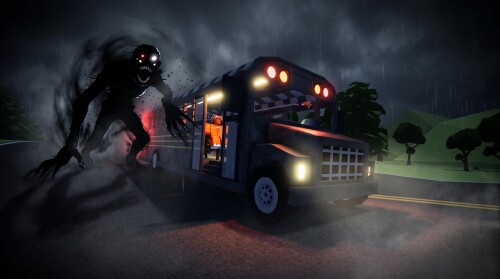
The route's stops: pickup, refuel and checkpoint
None of the bus's interactions need a control set of their own. Each one is attached to a place on the route, and arriving there is what starts it — the pickup, the refuel and the checkpoint inspection all play out as part of reaching their stops.
Scripted stops on the transport run
- 1
PRISONER PICKUP
Sheriff office stop
- 2
GAS STATION AHEAD
Refuel stop
- 3
ARMY CHECKPOINT
Inspection stop
The pickup happens at a sheriff office marked PRISONER PICKUP. Prisoners board through the bus door, and a printed CRIMINAL report is reviewed before the trip continues. For a closer look at that stop, see the page on how to pick up prisoners.
The GAS STATION AHEAD prompt announces the refuel stop: refueling there uses the station pump or a handheld nozzle, at $5.00 per gallon. At the ARMY CHECKPOINT, soldiers board the bus, carry out their inspection and then wave it through — no extra input is needed beyond arriving.
Steering and stopping
The control picture stays deliberately small after E. These are PC-style keyboard controls, and E to Drive from the wheel is the one the gameplay names outright. "Stopping" in practice means reaching the next scripted stop: the bus pulls in at the pickup, the station or the checkpoint, and that stop's event — boarding, refueling or inspection — plays out on arrival, while the Miles Left bar keeps counting down the journey in between.
Where these controls fit in the run
A full Prison Bus transport run asks very little of the keyboard: prepare the bus, sit at the wheel, press E to Drive, and handle each stop as the route puts it in front of you. If you're starting from scratch, the Prison Bus beginner guide is the natural first stop, and the Prison Bus route guide covers the wider journey.
Related Guides
Bus Repair: Wheels, Fuel, First Drive
Fix up the undrivable starter bus: collect four wheels, fill the tank with the red fuel can, and start your first drive.
Route: Where to Drive
Follow the route from garage to prisoner pickup to Blackwell Prison, including gas stops and what each stop is for.
How to Pick Up Prisoners
Find how prisoner pickups work: the bus stops at marked sheriff office locations and prisoners board automatically.
Beginner Guide: Your First Run
See how a full run plays out, then follow the exact garage-start first steps: wheels, fuel, and pressing E to Drive.